Inspetor Web: lightweight on-page HTML and CSS inspector for Chrome
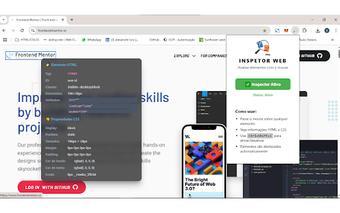
Inspetor Web, developed by Alexandre Silva Lins Junior, is a Chrome extension that lets you inspect page structure and style without opening the full developer toolbox. It surfaces element data in an organized tooltip so you can read typography, layout, color, attributes, and dimensions at a glance. The extension focuses on rapid, low-distraction inspection. Front-end developers, web designers, and students get a compact way to audit layouts and learn component structure.
Very small install size reduces extension overhead
The extension ships under a 40KiB footprint, a fact that minimizes storage and initial load impact compared with heavier add-ons. That small size keeps the installer and extension bundle compact, so the browser catalog of extensions increases without a proportional jump in disk use. For teams or learners who install multiple helper tools, the low-on-disk profile matters when keeping a clean development environment.
Privacy-first design avoids external data transmission
Inspetor Web uses a privacy-first architecture that does not collect personal data or communicate with external servers. Because inspection runs locally, the tool reduces tracking exposure that comes from cloud-based analysis. This local-only behavior means page details are revealed on your machine without telemetry, which suits workflows that require keeping inspection data off third-party services.
Quick activation and a focused overlay fit ad-hoc workflows
The tool activates from the toolbar icon or the Ctrl+Shift+I keyboard shortcut to toggle an inspection overlay, which supports rapid context switches during development tasks. Once enabled, it highlights the active element so you can locate structure without searching through nested panes. The toggle model makes it easy to inspect intermittently during design iterations and classroom exercises.
Works across Chromium browsers and complements full devtools
The extension is compatible with Chrome and other Chromium-based browsers, including:
- Chrome
- Microsoft Edge
- Brave and Opera
It positions itself as an alternative to the browser’s built-in developer tools by offering quicker, lightweight checks rather than the full debugging feature set; developers who need deep inspection or profiling still rely on the native toolbox.
A focused learning and quick-check tool best suited to short inspections
Inspetor Web is a practical option for learners and professionals who want a local, low-overhead way to examine page structure during quick checks and prototyping. Because it is described as an alternative rather than a replacement for full developer tools, users who need advanced debugging should keep native devtools available. The extension is available now and is awaiting its first user ratings on the Chrome Web Store.